Duplicate, archive, and delete forms
Copy an existing form as a new draft, hide a form you're done with from your active list, restore it later, and understand why deleting a form isn't offered.
Before you start
- You need access to the Forms area of the portal.
- The two actions live in different places: Duplicate is only on the ⋯ menu of a row on the Forms list, while Archive / Unarchive is on that menu and on the Archive card at the bottom of the builder's Settings tab. There is no Duplicate button inside the builder.
Steps
Duplicate a form
-
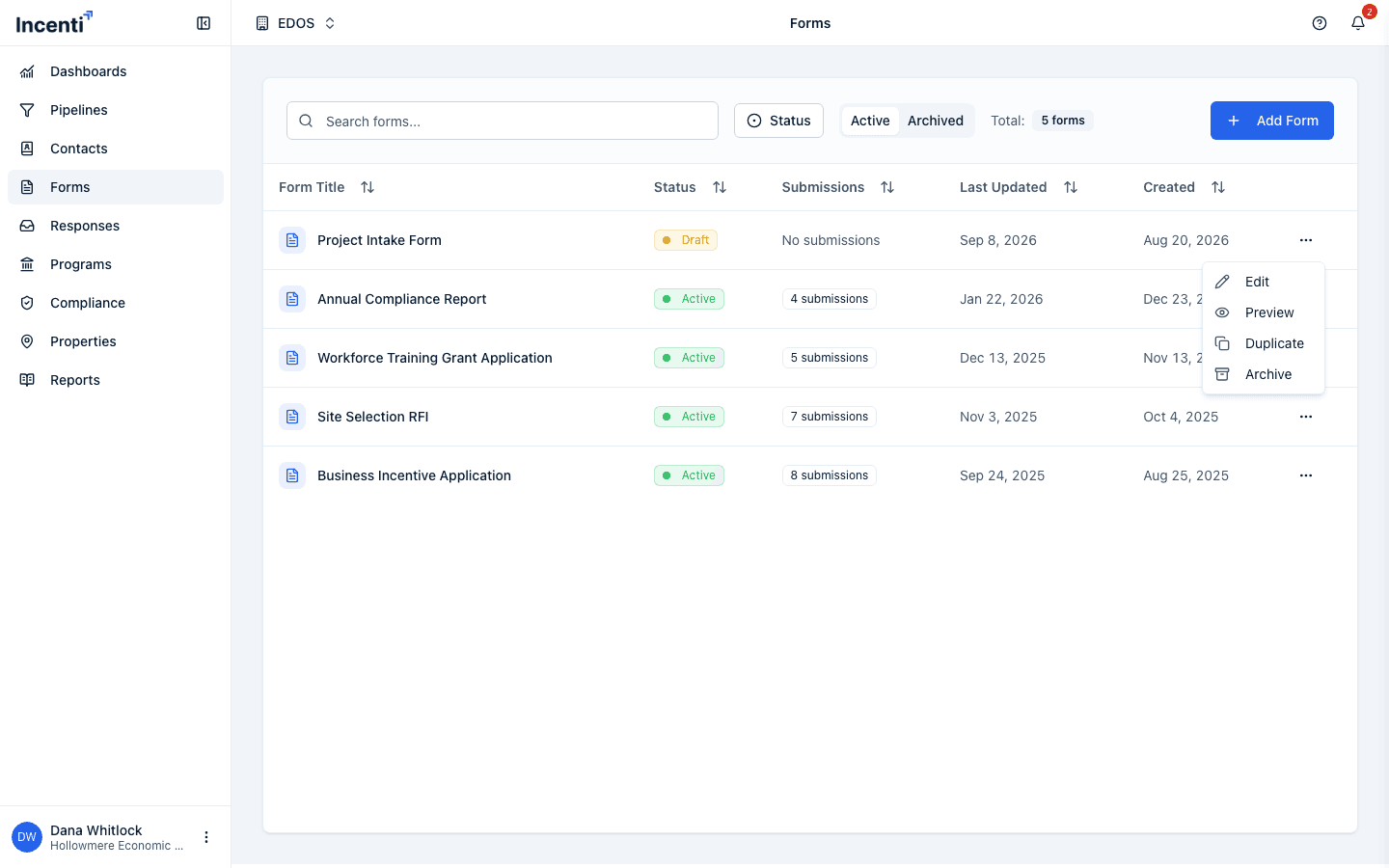
On the Forms list, click the ⋯ menu on the form's row.
-
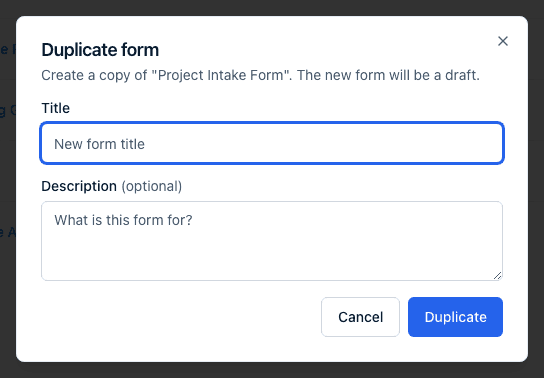
Choose Duplicate. In the Duplicate form dialog ("Create a copy of ... The new form will be a draft."), enter a Title (required) and, optionally, a Description.
-
Click Duplicate. You're taken straight into the builder for the new copy.
Archive a form
- From the Forms list, click the ⋯ menu on the row and choose Archive — or, from inside the builder, open the Settings tab and click Archive under the Archive card.
- A confirmation dialog asks Archive form? (or Archive this form? from the builder) and explains that the form will be hidden from your active list and can be restored later. Confirm with Archive.
Restore an archived form
- On the Forms list, switch to the Archived tab to see archived forms.
- Click the ⋯ menu on the row and choose Unarchive — or, from inside the builder's Settings tab, click Unarchive under the same card.
Where each action lives
| Action | Forms list ⋯ menu | Builder Settings tab |
|---|---|---|
| Edit | Yes | — |
| Preview | Yes | Header button |
| Duplicate | Yes | No |
| Archive / Unarchive | Yes | Yes |
| Delete | Not offered | Not offered |
What happens next
- Archiving a form removes it from the Active tab of the forms list, but doesn't change its status (Draft, Active, or Closed) or stop it from accepting responses — an archived form that's still Active keeps accepting submissions at its public link.
- Duplicating a form creates a brand-new form in Draft status with a copy of the source form's fields, pages, scoring criteria, and rules. It does not copy the source form's responses.
- Unarchiving moves a form back to the Active tab; nothing else about it changes.
- Archiving changes nothing about a form's responses. They stay in Responses and keep their links to opportunities, contacts, and properties, and you can still open, edit, score, and export them. The archived form keeps its own public link, its expiration, and its scoring criteria too.
- A duplicate copies the source form's fields, pages, sections, conditional rules, scoring criteria, and CRM mappings. It does not copy the source's status, its expiration date, its public link, or any responses — the copy is a fresh Draft with its own link.
Common questions
Q: Does duplicating a form copy its responses? A: No. Only the form's structure — its fields, pages, scoring criteria, and rules — is copied. The new form starts as a Draft with zero responses.
Q: Can respondents still open an archived form's link? A: Yes, if the form's status is still Active. Archiving only hides the form from your Forms list — it's a separate thing from the form's Draft / Active / Closed status. To actually stop new responses, close the form (see Publish and share a form).
Q: Where did my form go? A: Check the Archived tab on the Forms list — archiving hides a form from the default Active view but doesn't delete it. You can restore it from there at any time.
Q: What happens to responses when I archive a form? A: Nothing. They stay in Responses exactly as they were, keep their links to opportunities and contacts, and remain editable, scoreable, and exportable. Archiving only hides the form from the Active tab of the Forms list.
Q: Does duplicating copy the expiration date, status, or share link? A: No. The copy is a brand-new Draft with its own public link and no expiration. What does come across is the structure: fields, pages, sections, rules, scoring criteria, and CRM mappings.
Q: Where is the Duplicate button inside the builder? A: There isn't one. The builder's Settings tab only offers Archive / Unarchive. To duplicate, go back to the Forms list and use the ⋯ menu on the form's row.
Q: Can I permanently delete a form? A: No. Deleting isn't offered for forms in the forms list or the builder. If you're done with a form, archive it instead; it keeps its responses and can be restored at any time.
Related
Last updated on