Roles and permissions
How your account role (Admin or Member) and your product access decide what you can see and do in Incenti, exactly what each role can change, and what only Incenti staff can set.
The two kinds of access
What you can see and do in Incenti is controlled by two separate settings on your user:
- Your Account Role, Admin or Member, decides whether you can manage the account itself: its users and its details.
- Your Products decide which modules appear in your sidebar at all.
They are independent. A Member can have access to every product your account owns and still not be able to manage users, and an Admin can be granted only one product.
What a Member can do
The short answer is: almost everything inside the modules they can see. Role does not restrict day-to-day work.
| Can do | Admin | Member |
|---|---|---|
| Forms: create, edit, activate, close, duplicate, archive; scoring criteria | Yes | Yes |
| Responses: review, edit answers, set status, score, send requests, delete, Answers Library | Yes | Yes |
| Contacts, organizations, notes, tags, pipelines, statuses, tasks, properties | Yes | Yes |
| Dashboards: create, edit, delete; charts, filters, saved KPIs | Yes | Yes |
| Reports: create, edit, archive, export, link exported documents | Yes | Yes |
| Documents: upload, edit, download, delete on any record they can open | Yes | Yes |
| Edit their own name, title, email, phone, photo, and theme | Yes | Yes |
A member can therefore delete a dashboard an admin built, archive a report someone else created, or delete a document another user uploaded. If that matters to your organization, agree it as a process — Incenti does not gate it by role.
What only an Admin can do
| Can do | Admin | Member |
|---|---|---|
| Add users, send invitations, disable and enable users | Yes | No |
| Set another user's Account Role and Products | Yes | No |
| Edit another user's name, title, phone, or photo | Yes | No |
| Edit account details: name, domain, phone, description, logo | Yes | No |
| Add, edit, and delete the account's addresses | Yes | No |
| Create, edit, and delete custom metric definitions | Yes | No |
| The opportunity Actions menu: Edit, Update Metrics, Request Responses, Generate Form Link, Delete | Yes | No |
| The program Actions menu and the Programs Manage menu | Yes | No |
Recording metric values on an opportunity sits behind Actions → Update Metrics, so it is an admin task even though defining the metric and recording a value are different things. See Define custom metrics for opportunities.
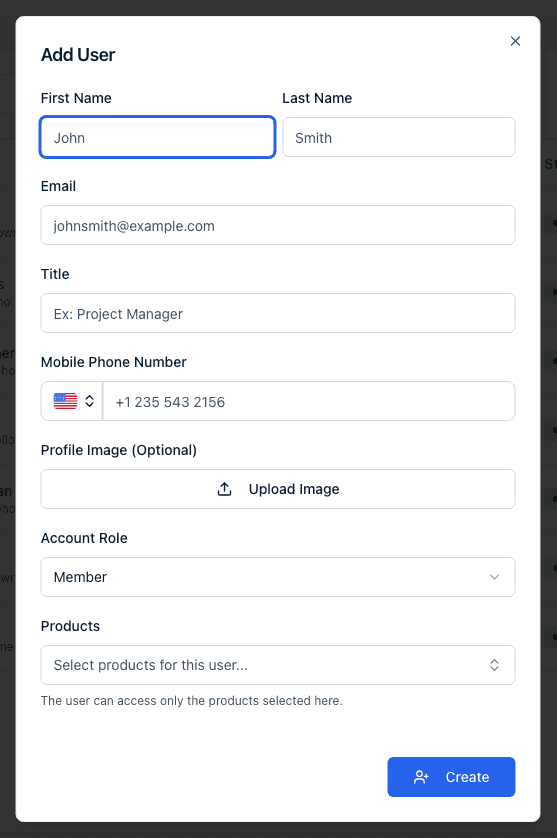
The Account Role picker on Add User starts on Admin, so a teammate added without changing it becomes an admin. See Invite and manage users.
What only Incenti can change
Some things are not available to any customer role. Contact support@incenti.co for these:
- Which products your account owns, and each product's seat limit.
- Your account type (economic development organization or site selector).
- Your account's brand colour, which sets the button colour on the emails your applicants and contacts receive.
- Activating or deactivating an account.
- Linking or unlinking a sub-account. See Parent accounts and sub-accounts.
- Turning modules and beta features on for your account, such as Compliance, Properties, Chats, and the Dashboards 2.0 experience.
- Global reference data: dashboard templates, standard form templates, form types, and Incenti's shared contact directory.
- Deleting a user, which permanently blocks that email address.
Product access
Each user is granted specific products, for example EDOS or Insights, when they are added, and an Admin can change them later from the user's profile. A module appears in your sidebar only when a product you have access to includes it, so two people on the same account, both Admins, can still see different sidebars. Some modules are also enabled per account rather than for everyone, so a module you have read about may not be available to your organization yet.
Economic development organization accounts also see Programs in the sidebar, where you manage the incentive programs you offer. It is the one module that depends on your account type rather than on product access.
Site selector accounts do not see Programs in the sidebar. It is only offered to economic development organizations, and no role or product grant adds it to a site selector account.
If you expect a module and do not see it, ask an Admin on your account to check your Products on your profile, or contact Incenti support.
What Incenti staff can see
Incenti support staff can open your account to troubleshoot a problem you have reported. That is a staff-only capability used for support: no user on your account, Admin or Member, can view another organization's account, and no one from another customer account can view yours. Each login belongs to exactly one account, so there is no account switcher for customers. See Sessions and security.
Common questions
Q: Can a member delete a dashboard, report, or document? A: A member can delete a dashboard and a document, and can archive a report (reports cannot be deleted by anyone). None of these are gated by role. See What is kept, archived, and deleted.
Q: Why can't I use Update Metrics on an opportunity? A: The whole opportunity Actions menu — Edit, Update Metrics, Request Responses, Generate Form Link, Delete — is limited to account admins. Ask an admin to make the change.
Q: Can a member change another member's name or title? A: No. Editing someone else's profile fields is an admin task. Everyone can edit their own.
Q: Why can't I see the Programs menu? A: Programs is shown only on economic development organization accounts. If your account is a site selector account you will not see it, whatever your role or product access.
Q: Who can see the Sub-accounts tab, and what can they do there? A: Everyone on an account that has sub-accounts linked to it can see the tab and read the list. Nobody on your account can open a sub-account or add one — that is an Incenti operation. See Parent accounts and sub-accounts.
Q: Can one login belong to two organizations? A: No. Each login belongs to exactly one account. If you need to work in a different organization's Incenti account, an Admin there has to add you as a separate user with a different email address.
Q: Why did someone from Incenti appear in our account? A: Incenti support staff can open a customer's account to help with a support request. Only Incenti staff can do this. No user on your account can view another organization's account.
Q: I'm an Admin but I still can't open a module. Why? A: Module visibility depends on your Products, not on your role. Open your profile and check the Products listed there. If the product you need is missing, another Admin can add it, and if your account does not own that product, contact Incenti support.
Q: What's the difference between my Account Role and my Products? A: Account Role (Admin or Member) controls whether you can manage users and account settings. Products control which modules you can see. You can be an Admin with one product or a Member with all of them.
Related
Last updated on